Repair
Name the symptom, then change one thing.
This page is a diagnostic list, not a mood. Start at the top if you are not sure what failed. Jump to a heading if you already know.
Work in this order
Reproduce with a thirty-second take
Use one window and a sentence of speech. A ten-minute project hides the moment it broke.
Write down three facts
macOS version, Apple or Intel, and whether Screen Recording is on in System Settings. If you cannot answer those, stop recording andfinish setup.
Change one setting, then test again
Flipping every privacy switch at once tells you nothing. After Screen Recording changes, quit from the menu bar or Dock and relaunch.
Blank or empty picture
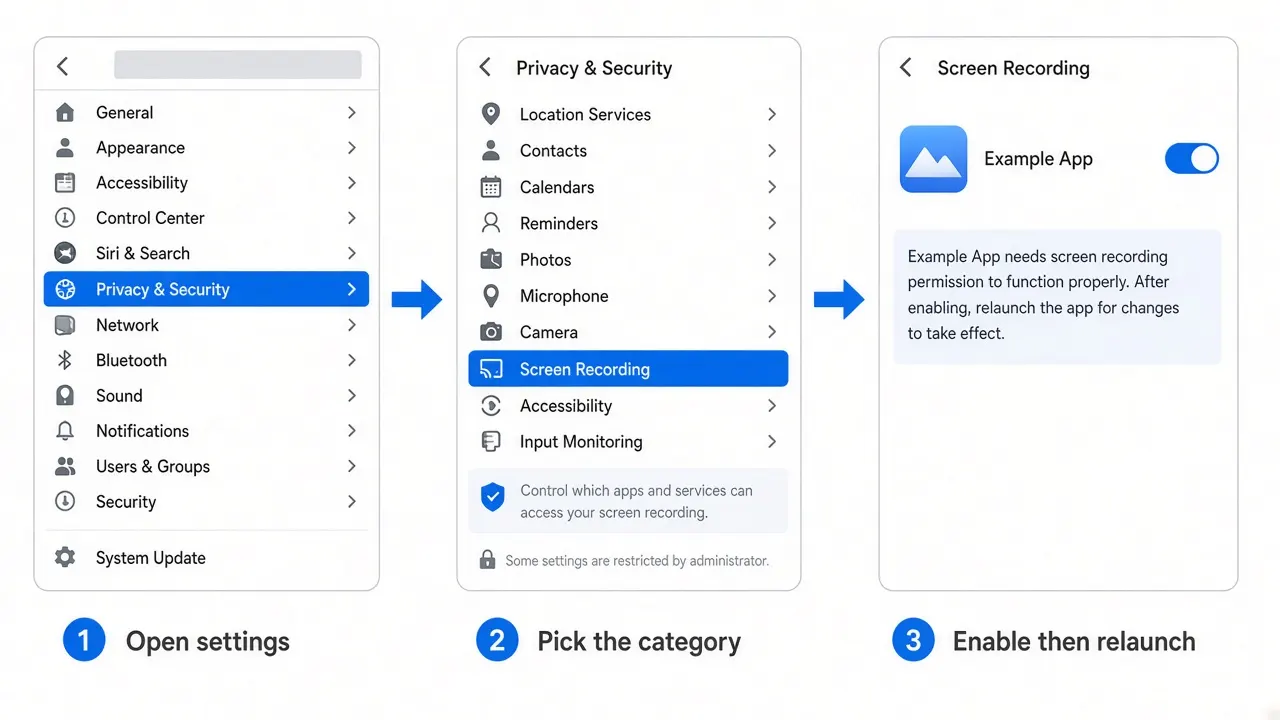
Screen Recording is off, or the app has not been relaunched since you turned it on.
Apple menu → System Settings → Privacy & Security → Screen Recording (the label may read Screen & System Audio Recording on current macOS). The app must be in the list and enabled.
Enable it. Quit the app completely. Open it from Applications. Record TextEdit. If the window list is empty when you try to capture one window, treat that as the same permission problem: the system is not handing windows to an app that cannot see the screen.
Confirm you are not recording a locked or empty Space. Unplug the extra display and try the built-in screen. If the Mac is below theofficial system requirements, stop here and use another tool.
Silent or doubled audio
Work this list from the top. Do not skip the meter.
See whether a source is selected
Official materials describe system audio, microphone, or both. A session with no source selected is silent. Open the recording controls and look before you perform.
Watch a level meter
Speak. Play a known sound in Safari. If the meter does not move, the file will not either. System audio records what is headed to the output device. Volume at zero is a silent stream. An app muted in its own window is also silent.
Grant Microphone if you need a voice
System Settings → Privacy & Security → Microphone. Apple’s own support pages say an app cannot record an input until this switch is on. Quit and reopen after you change it.
If the sound appears twice
You likely recorded system audio and a microphone while speakers were playing. The room mic hears the same output a moment later. Use headphones, or pick one source.
If only one app should be heard
Use the selected-apps option described in official audio notes, then confirm that app is actually producing sound. A conferencing tool can also hold the microphone exclusively — quit it and test again.
Zoom ignores the cursor
Picture is fine, but the frame never follows a click. Official permission copy mentions accessibility access on first launch. Automatic zoom also depends on the app knowing where you clicked. Re-enable Accessibility (and any related monitoring switch macOS shows for the app), relaunch, and record a take with several distinct clicks. If you turned automatic zoom down or off in the recording settings, the app is doing what you asked.
Cannot stop a take
Official documentation lists four exits: the Stop control on the recording widget, the menu bar icon, Finish Recording on the Dock icon, and the global shortcut from onboarding. On a MacBook with a notch, the menu bar icon may not be visible. Use the Dock or the shortcut. If the shortcut does nothing, it may collide with another app or with macOS; assign a new combination in the product settings.
Export is slow or huge
Official export notes say a 4K file can take about four times as long as HD. If the audience is a laptop or a phone, switch the output size down and encode again.
GIF encode is described as much slower than MP4. The same guide advises against GIFs longer than about one minute. Use MP4 for a lesson; keep GIF for a brief loop.
60 fps looks smoother and costs time and size. 24 or 30 is enough for most talking software tours. Compression (quality) is documented as not affecting encode time, so do not lower quality hoping for a faster export.
App will not open
- You may have downloaded the Intel build on Apple silicon, or the reverse. Check About This Mac and download again from the official page.
- You may be launching from a deleted disk image. Copy the app to Applications.
- macOS may be below 13.1. Update or choose another recorder.
- After a major system update, Privacy & Security entries sometimes need to be switched on again. Re-check Screen Recording before you reinstall.
If the symptom is still unclear, compare withanother tool for the same thirty-second test. That tells you whether the Mac can capture at all. Product defects and billing belong on the official site, not in our inbox.